Managing multiple AI coding sessions gets messy fast once you use more than one tool. Sessions end up scattered across local transcript files, JSONL logs, and SQLite databases. Finding an old session, checking which model was used, or jumping back into the right project usually means opening each tool separately and remembering where it stores state. ai-dash is a local terminal UI for multi-session management across Claude Code, Codex, and OpenCode.
It reads the official provider files for each tool, builds a shared session model, and lets you search, filter, sort, and reopen sessions without leaving the terminal. If you keep several AI sessions open across different repos and tools, this gives you one place to manage them.
Installation
Build it from source:
git clone https://github.com/adinhodovic/ai-dash.git
cd ai-dash
make build
./ai-dash
Or download a binary from the releases page:
curl -L https://github.com/adinhodovic/ai-dash/releases/latest/download/ai-dash-linux-amd64 -o ai-dash
chmod +x ai-dash
./ai-dash
The project is local-first. There is no hosted service and no API setup step.
What ai-dash reads
ai-dash only imports official session data from the tools it supports:
- Claude Code transcripts from
~/.claude/projects/ - Codex session logs from
~/.codex/ - OpenCode sessions from
~/.local/share/opencode/opencode.db
Those paths can be overridden in ~/.config/ai-dash/config.json.
Under the hood each source has its own native parser. Claude sessions come from JSONL transcripts, Codex sessions come from JSONL log files, and OpenCode sessions come from its SQLite database. The app does not try to support arbitrary exported JSON formats or custom loaders.
That restriction keeps the import logic simple and avoids the usual guessing around field names, timestamps, or project paths.
Configuration
The config file lives at ~/.config/ai-dash/config.json:
{
  "$schema": "https://raw.githubusercontent.com/adinhodovic/ai-dash/main/config.schema.json",
  "terminal": "ghostty",
  "poll_interval": "10s",
  "default_age_filter": "14d",
  "default_tool": "claude",
  "auto_select_tool": false,
  "nerd_font": null,
  "age_presets": ["1h", "1d", "3d", "7d", "14d", "30d"]
}
The $schema line enables editor autocompletion. If you want to inspect the schema directly, run:
ai-dash schema
terminal controls which emulator opens resumed or new sessions. Inside tmux or zellij, ai-dash can open sessions in a new tab or window instead of spawning a separate terminal.
Managing multiple AI coding sessions
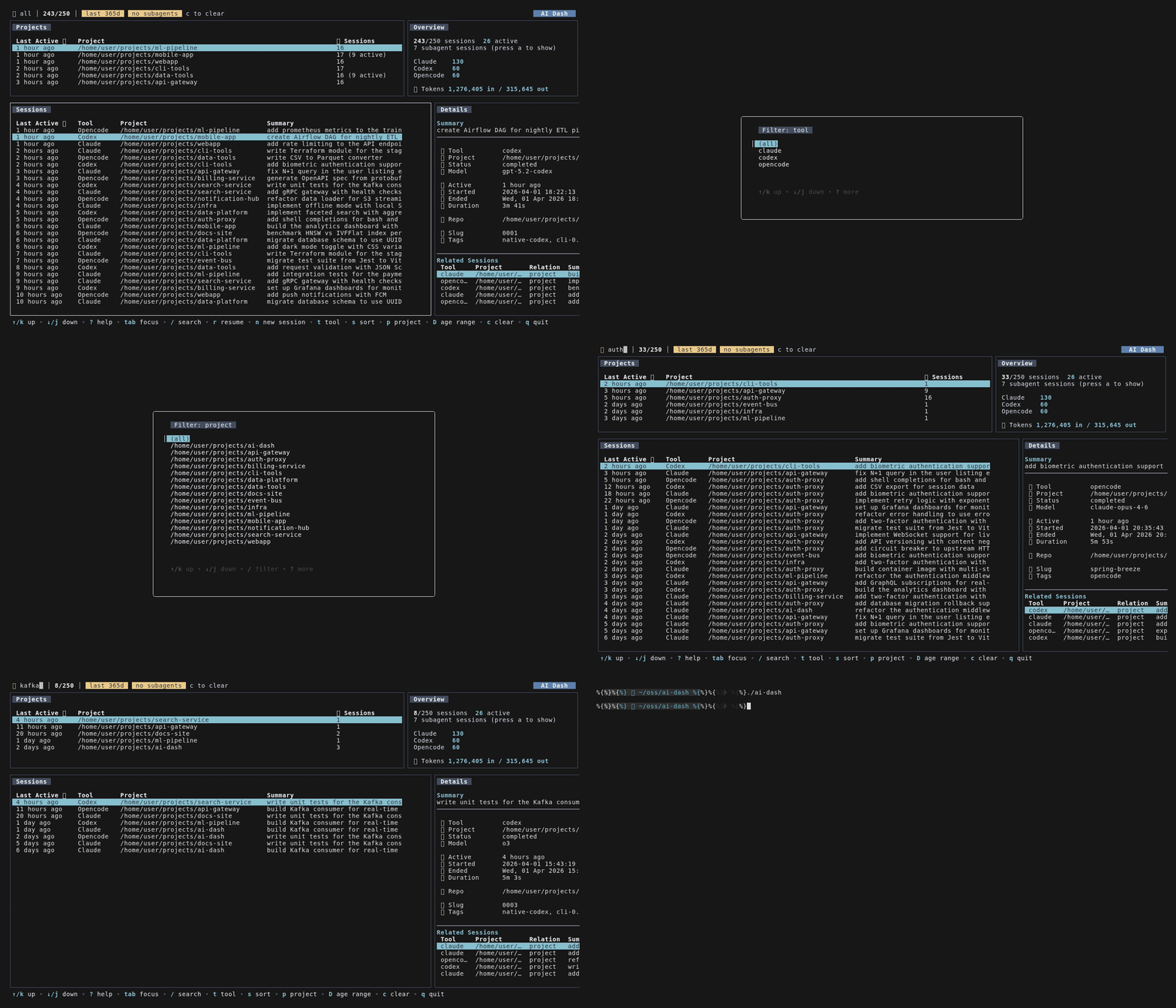
The UI has two main working areas. The top row groups sessions by project and shows aggregate stats. The bottom row lists individual sessions and a detail pane for the selected row. That makes it easier to manage multiple AI coding sessions without bouncing between three separate CLIs.
The detail pane shows the fields that tend to matter when trying to find a session again:
- tool
- project
- model
- started and last active time
- token counts and cost when the provider exposes them
- provider-specific metadata
- related sessions and subagents
Search is live as you type. Filters are built around how sessions are usually recalled in practice: by tool, by project, or by roughly when they happened.
/    search
t    filter by tool
p    filter by project
D    cycle age range
s    cycle sort for the focused table
a    toggle subagent sessions
Session and project tables sort independently. For example, you can sort projects by last activity in the top pane while sorting sessions by summary or tool in the bottom pane.
Claude Code, Codex, and OpenCode support
The interesting part of ai-dash is not the table UI. It is the normalization layer across three tools that store very different data.
For Claude Code, the parser walks transcript JSONL files and extracts the first user message as the summary, assistant model metadata, token usage, stop reason, cwd, and git branch.
For Codex, it reads session log files and combines session_meta, turn_context, response_item, and event_msg records into one session row. That gives you the project path, model, prompt summary, status, and CLI metadata without depending on a separate index.
For OpenCode, it opens the SQLite database read-only and pulls sessions from the session table. Model information is extracted from the message.data JSON payload, and the summary metadata includes additions, deletions, and changed files when present.
That means the detail pane can show a Claude branch, a Codex effort level, or OpenCode change stats without inventing fake common fields.
Resuming and starting sessions
Once a session is selected you can reopen it from the dashboard:
r    resume selected session
n    start a new session in the selected project
The command it runs depends on the provider:
- Claude Code uses
claude --resume <session-id> - Codex uses
codex resume <session-id> - OpenCode uses
opencode -s <session-id>
New sessions open in the project that is currently selected in either the project table or the session list. If you already work inside tmux or zellij, that usually means resuming an old session without leaving the current terminal workspace.
Subagents and related sessions
Child sessions are easy to lose once you have a few active projects and multiple tools in rotation. ai-dash tags and links those sessions where the provider exposes enough information, which helps when multi-session management starts to break down.
Claude subagents are inferred from transcript layout. OpenCode parent and child sessions come from the database fields directly. The dashboard can hide or show those child sessions, and the detail pane keeps related rows nearby so you can follow work that branched off from a parent task.
That is useful for the cases where one long session spawned several narrower ones and the original prompt is no longer the best way to find them.
Development notes
The app is written in Go and uses Bubble Tea for the TUI, Cobra for the CLI, and Viper for configuration.
The development commands are straightforward:
make fmt
make build
make test
golangci-lint run ./...
The source tree is split by concern:
internal/sourcesfor discovery and provider parsersinternal/sessionfor the shared session model and sortinginternal/uifor the Bubble Tea dashboardinternal/configfor config loading and JSON schema generation
That keeps the provider-specific parsing logic separate from the rendering code, which matters once the session formats start drifting between tools.
Summary
ai-dash solves a small but real problem: managing multiple AI coding sessions across tools gets tedious once each tool keeps its own local history in a different format. This gives you one terminal view across Claude Code, Codex, and OpenCode, with enough provider-specific detail to browse, filter, and resume old work without hunting through each tool separately.
If you run into issues or want support for another official provider format, open an issue in the ai-dash repository.
